> ## Documentation Index
> Fetch the complete documentation index at: https://hacktronai-changelog-5b138732.mintlify.site/llms.txt
> Use this file to discover all available pages before exploring further.
# Repository configuration
> Use .hacktron/config.yaml to control which pull and merge requests Hacktron scans, and when a finding should fail the check.
Add a `.hacktron/config.yaml` file to your repository to control Hacktron's Code Review behavior:
* **Skip** specific pull and merge requests so they aren't scanned.
* **Fail** the Hacktron check when a finding meets a severity threshold, so risky changes can't merge.
This is separate from [`.hacktron/rules.md`](/code-review/rules), which shapes the *quality* of a review. `config.yaml` controls *whether* a PR is scanned and *whether* its check passes.
## File location
Place the file at the root of the repository, inside the `.hacktron` directory:
Either `.hacktron/config.yaml` or `.hacktron/config.yml` is accepted. If both exist, `.yaml` is used.
Hacktron always reads `config.yaml` from your repository's **default branch**
(for example `main`), never from the pull or merge request being scanned. A PR
cannot change its own scanning rules. Commit `config.yaml` to your default
branch for it to take effect.
## Example
```yaml theme={null}
# .hacktron/config.yaml
# Skip a PR/MR from being scanned when any rule below matches.
skip:
labels:
- hacktron-skip
keywords:
- "[skip hacktron]"
paths:
- "vendor/**"
- "**/*.md"
# Fail the Hacktron check when a finding is at or above this severity.
fail_on:
severity: high
```
Every key is optional. An empty or absent `config.yaml` means Hacktron behaves as it does today: it scans all covered PRs and the check stays green unless the scan itself errors.
## Skip scans
Use the `skip` block to tell Hacktron not to scan a pull or merge request. When a PR matches, Hacktron records a **skipped** check on the PR/MR and posts a short comment naming the rule that matched. No scan runs, and **no developer seat is used**.
Rules are evaluated in this order; the first match wins:
| Key | Matches when | Match style |
| --------------- | ---------------------------------------------------- | -------------------------- |
| `skip.labels` | the PR/MR carries one of these labels | exact, case-insensitive |
| `skip.keywords` | the PR/MR **title** contains one of these strings | case-insensitive substring |
| `skip.paths` | **every** changed file matches one of these patterns | gitignore-style globs |
```yaml theme={null}
skip:
labels:
- hacktron-skip # label the PR "hacktron-skip" to skip it
keywords:
- "[skip hacktron]" # put this anywhere in the PR/MR title to skip it
paths:
- "docs/**" # skip when the PR only touches these paths
- "**/*.md"
```
`skip.paths` skips a scan **only when every changed file matches** one of the
patterns. If even one changed file falls outside the patterns, the PR is
scanned as usual. Patterns use the same syntax as `.gitignore` — for example
`vendor/**`, `**/*.md`, or `docs/`.
A manual `@hacktronai review` comment always runs a scan, even when a `skip` rule would otherwise match — use it to force a one-off review of an otherwise-skipped PR.
## Fail the check on findings
By default, the Hacktron check is green as long as the scan completes. Findings are posted as inline comments but don't block the merge. Configure a severity threshold to turn the check **red** when a finding is at or above that level.
When a finding triggers the gate, the GitHub check run (or GitLab commit status) is marked failed.
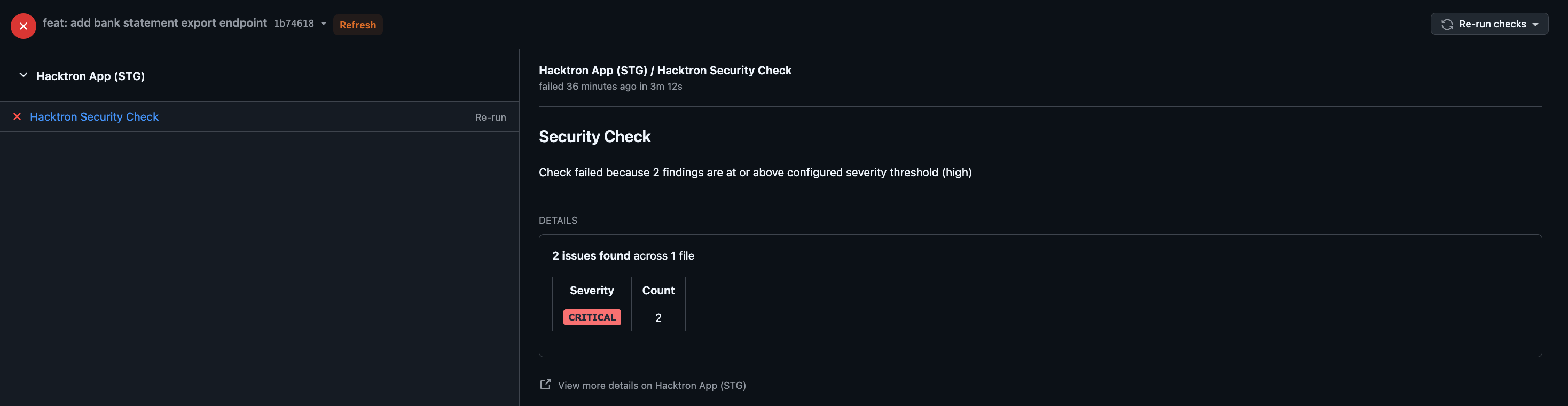 The threshold is **inclusive**: `high` fails the check on `high` *and* `critical` findings, while `critical` fails only on `critical`.
Triaging a finding updates the existing check directly. A finding only counts toward the threshold while it's still **open or confirmed valid**; triaging it as anything else removes it from the gate and immediately recomputes the check.
You can set the threshold org-wide from the settings page, or per repository in `config.yaml`. The repository config always takes precedence.
Set a default for all repositories in your organization:
Select your organization, then go to **Settings**.
Locate **Severity threshold**, above the SLA Thresholds card.
The threshold is **inclusive**: `high` fails the check on `high` *and* `critical` findings, while `critical` fails only on `critical`.
Triaging a finding updates the existing check directly. A finding only counts toward the threshold while it's still **open or confirmed valid**; triaging it as anything else removes it from the gate and immediately recomputes the check.
You can set the threshold org-wide from the settings page, or per repository in `config.yaml`. The repository config always takes precedence.
Set a default for all repositories in your organization:
Select your organization, then go to **Settings**.
Locate **Severity threshold**, above the SLA Thresholds card.
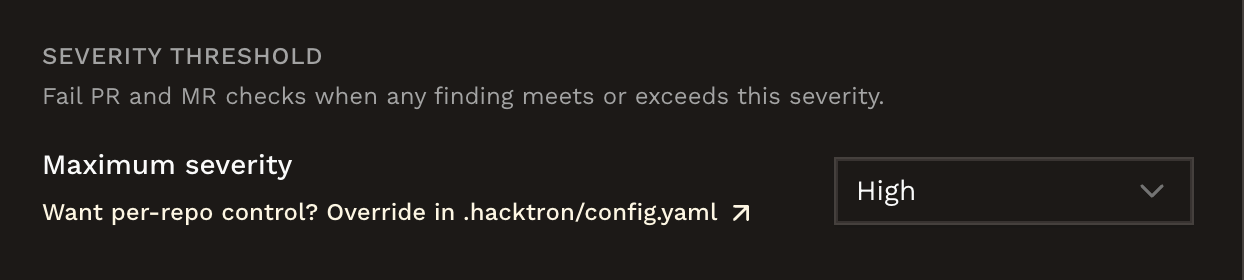 Pick a severity from the dropdown: **Critical**, **High**, **Medium**, or **Low**. Select **Off** to disable the gate org-wide.
Add a `fail_on` block to `.hacktron/config.yaml` to set or override the threshold for a specific repository:
```yaml theme={null}
fail_on:
severity: high # fail the check on any high or critical finding
```
`severity` must be one of, from most to least severe:
`critical` › `high` › `medium` › `low` › `info`
## How invalid config is handled
Hacktron is **fail-open** about configuration — a config problem never silently blocks your development:
* A missing, empty, or malformed `config.yaml` is ignored. Hacktron scans normally and the check stays green.
* Unknown keys are ignored, so a config can carry settings for future features without breaking today's scans.
* A type mismatch on a known key (for example `fail_on.severity: 7`) causes the **whole file** to be ignored. Keep values in the shapes shown above.
## Related
Add `.hacktron/rules.md` to give reviews repository-specific context.
Connect a Git provider, enable repositories, and choose covered branches.
Pick a severity from the dropdown: **Critical**, **High**, **Medium**, or **Low**. Select **Off** to disable the gate org-wide.
Add a `fail_on` block to `.hacktron/config.yaml` to set or override the threshold for a specific repository:
```yaml theme={null}
fail_on:
severity: high # fail the check on any high or critical finding
```
`severity` must be one of, from most to least severe:
`critical` › `high` › `medium` › `low` › `info`
## How invalid config is handled
Hacktron is **fail-open** about configuration — a config problem never silently blocks your development:
* A missing, empty, or malformed `config.yaml` is ignored. Hacktron scans normally and the check stays green.
* Unknown keys are ignored, so a config can carry settings for future features without breaking today's scans.
* A type mismatch on a known key (for example `fail_on.severity: 7`) causes the **whole file** to be ignored. Keep values in the shapes shown above.
## Related
Add `.hacktron/rules.md` to give reviews repository-specific context.
Connect a Git provider, enable repositories, and choose covered branches.